
Networking for Cloud & DevOps
Networking for Cloud & DevOps
Module-1) Networking Fundamentals
What is Networking?
- Types of Networks (LAN, WAN, MAN, PAN)
- Client–Server vs Peer-to-Peer
- Network Topologies (Star, Bus, Ring, Mesh)
- OSI Model (7 Layers – Easy Explanation)
- TCP/IP Model
- Difference between OSI & TCP/IP
- Summary of Networking Fundamentals
Module-2) IP Addressing Basics
- What is an IP Address?
- IPv4 vs IPv6
- Structure of IPv4 Address
- Public IP vs Private IP
- Static IP vs Dynamic IP
- Loopback Address
- APIPA Address
- Summary of IP Addressing Basics
Module-3) Subnetting (Beginner Friendly)
- What is Subnetting?
- Why Subnetting is Required
- CIDR Notation
- Network ID & Broadcast Address
- Basic Subnet Calculations
- Subnetting Examples (Simple Level)
- Subnetting for Cloud (AWS Use Case)
- Summary of Subnetting (Beginner Friendly)
Module-4) Networking Devices
- Hub, Switch, Router
Modem - Firewall (Basic Concept)
- Load Balancer (Intro Level)
- Gateway
- NAT Device
- Summary of Networking Devices
Module-5) Protocols & Ports (Important for DevOps)
- What is a Protocol?
- TCP vs UDP
- Common Protocols:
HTTP / HTTPS
FTP / SFTP
SSH
SMTP, POP3, IMAP
DNS
ICMP - Well-Known Ports (22, 80, 443, 3306, etc.)
- Summary of Protocols & Ports
Module-6) DNS (Domain Name System)
- What is DNS?
- How DNS Works
- Domain Name Structure
- DNS Records:
A, AAAA & CNAME - MX & TXT
- Public DNS vs Private DNS
- DNS in Cloud (Overview)
- Summary of DNS (Domain Name System)
Module-7) Networking Security Basics
- What is a Firewall?
- Inbound vs Outbound Rules
- Security Groups (Concept)
- Network ACLs (Concept)
- Stateful vs Stateless Firewall
- Basic Network Security Best Practices
- Summary of Networking Security Basics
Module-8) Cloud Networking Basics (AWS Focus)
- What is a Virtual Network?
- Introduction to VPC
- CIDR in AWS VPC
- Public Subnet vs Private Subnet
- Internet Gateway
- NAT Gateway (Concept)
- Route Tables
- Elastic IP (Overview)
- Summary of Cloud Networking Basics (AWS Focus)
Module-9) DevOps Networking Essentials
- How Applications Communicate Over Network
- CI/CD Networking Basics
- SSH Access to Servers
- Application Ports & Firewall Rules
- Load Balancer Concept for Applications
- Reverse Proxy (Basic Idea)
- Networking for Docker & Containers (Intro)
- Summary of DevOps Networking Essentials
Module-10) Troubleshooting & Practical Understanding
- Common Networking Issues
Ping, Traceroute, Netstat, Curl (Basic Usage) - DNS Troubleshooting Basics
- Network Connectivity Checklist
- Cloud Networking Best Practices
- Summary of Troubleshooting & Practical Understanding
Linux
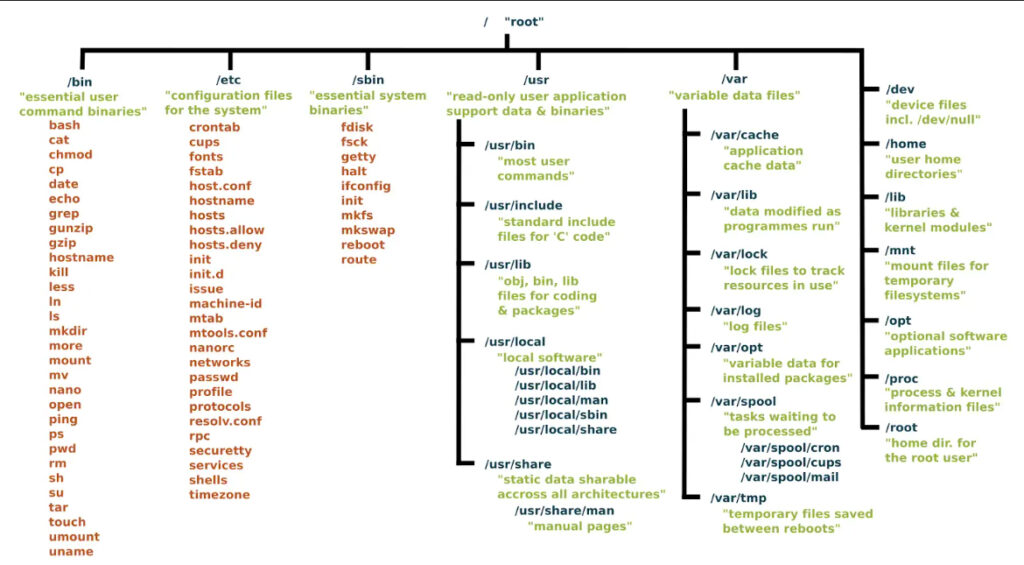
What Will I Learn?
- Learn basic to advanced commands
- Manage users and groups
- File Permission and ownership commands
- Understanding system processes
- install,remove,purge pacakges
- Solved common system issues
- Cheat sheets and notes provided
Red Hat System Administration I
Module 1: Get started with Red Hat Enterprise Linux
Module 2: Describe and define
Open source, Linux, Linux distributions, and Red Hat Enterprise Linux
Module 3: Access the command line
Log into a Linux system and run simple commands using the shell.
Module 4: Manage files from the command line
Copy, move, create, delete, and organize files while working from the bash shell.
Module 5: Get help in Red Hat Enterprise Linux
Resolve problems by using local help systems.
Module 6: Create, view, and edit text files
Manage text files from command output or in a text editor.
Module 7: Manage local users and groups
Create, manage, and delete local users and groups.
Administer local password policies.
Module 8: Control access to files
Set Linux file system permissions on files.
Interpret the security effects of different permission settings.
Module 9: Monitor and manage Linux processes
Evaluate and control processes running on a Red Hat Enterprise Linux system.
Module 10: Control services and daemons
Control and monitor network services and system daemons with the systemd service.
Module 11: Configure and secure SSH
Configure secure command line service on remote systems, using OpenSSH.
Module 12: Analyze and store logs
Locate and accurately interpret logs of system events for troubleshooting purposes.
Module 13: Manage networking
Configure network interfaces and settings on Red Hat Enterprise Linux servers.
Module 14: Install and update software packages
Download, install, update, and manage software packages from Red Hat and DNF package repositories.
Module 15: Access Linux file systems
Access, inspect, and use existing file systems on storage attached to a Linux server.
Module 16: Analyze servers and get support
Investigate and resolve issues in the web-based management interface.
Get support from Red Hat to help solve problems.
Module 17: Comprehensive review
Review the content covered in this course by completing hands-on exercises.
Bash Shell Scripting ( Automation Language )
What Will I Learn?
- Introduction to Shell Scripting
- Understanding the basic shell commands
- Familiarization In-built & System variables
- Control structure, loops, operators, condition statements
- Advanced shell scripting techniques and best practices
- Working with Arithmetic Operations
Shell Scripting Course Outline
1. Getting Started with Bash Scripting
Introduction to Bash scripting.
Basic concepts and setup.
2. Use of Shebang, Built-in Keywords & Echo
Understanding the shebang (#!).
Common built-in keywords.
Using echo for output.
3. User-Defined Variables & System-Defined Variables
Defining and using variables.
Differences between user-defined and system-defined variables.
4. Taking Input from User & Command Line Arguments
Methods to take user input.
Handling command line arguments.
5. Use Read Operator in Script
Using the read operator for input.
6. Passing Arguments in Shell Script
Techniques to pass arguments to scripts.
7. Using If, Then, Else & Else-If Statements
Conditional statements: if, then, else, elif.
8. Using File Operators in Script
Working with file operators for file handling.
9. Nested If Conditions & Appending Text
Implementing nested if conditions.
Techniques to append text to files.
10. Using Logical OR Operator in Bash Shell Scripting
Utilizing logical OR operators for conditions.
11. Performing Arithmetic Operations on Integers
Arithmetic operations with integers.
12. Arithmetic Operations on Decimal Numbers
Performing arithmetic operations on decimals.
13. Case Statement in Shell Script
Using case statements for multiple conditions.
14. While Loop, Syntax, Reading a File, Until, For Loop
Loop constructs: while, until, for.
Syntax and usage.
Reading a file within loops.
15. Difference Between $@ and $* in Shell Script
Understanding the difference between $@ and $*.
16. Break & Continue Statements in Shell Script
Using break and continue in loops.
17. Select from Menu in Shell Script
Creating interactive menus using select.
18. Debug Shell Script & Exit from Shell Script
Debugging techniques.
Exiting from scripts properly.

AWS Certified Cloud Practitioner (CLF-C02)
AWS Certified Cloud Practitioner (CLF-C02)
Module 1: Introduction to Amazon Web Services
- Summarize the benefits of AWS
- Differences Between On-Demand Delivery and Cloud Deployments
- Explain the Pay as you Go Model
- Summary of Amazon Web Services
Module 2: Compute in the Cloud
- Benefits of Amazon Elastic Compute Cloud (Amazon EC2)
- Different Amazon EC2 Instance Types
- Various Billing Options for Amazon EC2
- Benefits of Amazon EC2 Auto Scaling
- Benefits and Uses of Elastic Load Balancing
- Differences Between Amazon Simple Notification Service (Amazon SNS) and Amazon Simple Queue Services (Amazon SQS)
- Additional AWS Compute Options
- Summary of AWS Compute
Module 3: Global Infrastructure and Reliability
- Benefits of the AWS Global Infrastructure
- Concept of Availability Zones
- Benefits of Amazon CloudFront and Edge Locations
- Methods for Provisioning AWS Services
- Summary of AWS Global Infrastructure
Module 4: Networking
- Basic Concepts of Networking
- Public vs. Private Networking Resources
- Virtual Private Gateway (Real-Life Scenario)
- Virtual Private Network (VPN) (Real-Life Scenario)
- Benefit of AWS Direct Connect
- Benefit of Hybrid Deployments
- Layers of Security in an IT Strategy
- Services Used to Interact with the AWS Global Network
- Summary of AWS Networking
Module 5: Storage and Databases
- Basic Concepts of Storage and Databases
- Benefits of Amazon Elastic Block Store (Amazon EBS)
- Benefits of Amazon Simple Storage Service (Amazon S3)
- Benefits of Amazon Elastic File System (Amazon EFS)
- Various Storage Solutions
- Benefits of Amazon Relational Database Service (Amazon RDS)
- Benefits of Amazon DynamoDB
- Various Database Services
- Summary of AWS Databases
Module 6: Security
- Benefits of the Shared Responsibility Model
- Multi-Factor Authentication (MFA)
- AWS Identity and Access Management (IAM) Security Levels
- Basic Security Policies
- Benefits of AWS Organizations
- Benefits of Compliance with AWS
- Primary AWS Security Services
- Summary of AWS Security
Module 7: Monitoring and Analytics
- Approaches to Monitoring Your AWS Environment
- Benefits of Amazon CloudWatch
- Benefits of AWS CloudTrail
- Benefits of AWS Trusted Advisor
- Summary of AWS Monitoring
Module 8: Pricing and Support
- AWS Pricing and Support Models
- AWS Free Tier
- Key Benefits of AWS Organizations and Consolidated Billing
- Benefits of AWS Budgets
- Benefits of AWS Cost Explorer
- Primary Benefits of the AWS Pricing Calculator
- Various AWS Support Plans
- Benefits of AWS Marketplace
- Summary of AWS Pricing
Module 9: Migration and Innovation
- Migration and Innovation in the AWS Cloud
- AWS Cloud Adoption Framework (AWS CAF)
- Six Key Factors of a Cloud Migration Strategy
- Benefits of AWS Data Migration Solutions
- AWS Snowcone, AWS Snowball, AWS Snowmobile
- Innovative Solutions Offered by AWS
- Five Pillars of the AWS Well-Architected Framework
- Summary of AWS Migration
Module -10) Prepare for the Exam + Practice Exam
Foundational
AWS Certified Cloud Practitioner Foundational
- Introduction to the Exam.
- State of Learning Checkpoint – AWS CLF-C02.
- Link to Whitepapers.
- How the Exam Works.
Practice Exam 1: AWS Certified Cloud Practitioner Exam.
AWS Certified AI Practitioner (AIF-C01)
AWS Certified AI Practitioner (AIF-C01)
AWS Certified AI Practitioner validates in-demand knowledge of artificial intelligence (AI), machine learning (ML), and generative AI concepts and use cases. Sharpen your competitive edge and position yourself for career growth and higher earnings.
Module-1) Introduction to Artificial Intelligence
- Welcome to the Course
- What is Artificial Intelligence (AI)?
- Course Overview and Learning Outcomes
- Exam Success Tips
Module-2) Getting Started with AWS and Cloud Computing
- Traditional IT vs Cloud
- Introduction to Cloud Computing
- Types of Cloud Models (IaaS, PaaS, SaaS)
- Overview of AWS Cloud Platform
- Creating and Configuring an AWS Account
- Shared Responsibility Model
- Navigating the AWS Console
- Exam Success Tips
Module-3) Budget Planning and Cost Management
- Understanding Course-Related AWS Costs
- Setting Up AWS Budgets and Alerts
- Exam Success Tips
Module-4) Introduction to Generative AI & Amazon Bedrock
- What is Generative AI (GenAI)?
- Overview of Amazon Bedrock and its Features
- Understanding Foundation Models (FM)
- Evaluating Foundation Models in Bedrock
- RAG (Retrieval Augmented Generation) and Knowledge Bases
- Introduction to Guardrails and Agents in Bedrock
- CloudWatch Integration and Monitoring
- Exploring Amazon Bedrock AI Use Cases
- Exam Success Tips
Module-5) Fundamentals of Prompt Engineering
- Basics of Prompt Engineering
- Prompt Engineering Techniques and Templates
- Optimizing Prompt Performance
- Best Practices for Crafting Effective Prompts
- Exam Success Tips
Module-6) Exploring Amazon Q
- Amazon Q Business
- Amazon Q Apps
- Amazon Q Developer Tools
- Using Amazon Q for AWS Services
- Introduction to PartyRock
- Exam Success Tips
Module-7) AWS Managed AI Services Overview
- Why Use AWS Managed AI Services?
- Amazon Comprehend
- Amazon Translate
- Amazon Transcribe
- Amazon Polly
- Amazon Rekognition
- Amazon Lex
- Amazon Textract
- Amazon Augmented AI (A2I)
- Comprehend Medical & Transcribe Medical
- AWS Hardware Innovations for AI
- Exam Success Tips
Module-8) Deep Dive into Amazon SageMaker
- Introduction to SageMaker
- Data Preparation and Tools
- Model Deployment and Monitoring
- Human-in-the-Loop Capabilities
- Governance and Security Features
- SageMaker Console and Interface Overview
- Additional SageMaker Capabilities
- Exam Success Tips
Module-9) Challenges and Responsibilities in AI
- Understanding AI Challenges
- Ethical and Responsible AI Development
- Governance and Compliance in AI
- GenAI Risks and Controls
- Security & Privacy in AI Deployments
- GenAI Security Scoping Matrix
- Introduction to MLOps
- Exam Success Tips
Module-10) AWS Identity & Access Management (IAM)
- IAM Users and Groups
- IAM Policies and Permissions
- IAM Roles and Role-Based Access Control (RBAC)
- Exam Success Tips
Module-11) Amazon S3 and Storage Essentials
- Introduction to Amazon S3
- S3 Storage Classes and Use Cases
- S3 Security Best Practices
- Exam Success Tips
Module-12) Compute Services for AI Workloads
- Launching EC2 Instances
- EC2 User Data and Basic Web Server Setup
- Introduction to AWS Lambda
- Exam Success Tips
Module-13) AWS Security Tools and Services
- Amazon Macie for Data Classification
- AWS Config for Compliance
- Amazon Inspector for Vulnerability Scanning
- AWS CloudTrail for Audit Logs
- AWS Artifact for Compliance Reports
- AWS Audit Manager Overview
- AWS Trusted Advisor for Best Practices
- Exam Success Tips
Module-14) AWS Networking & VPC Security
- Introduction to Virtual Private Cloud (VPC)
- Network Access Control and Subnetting
- VPC Security Best Practices
- Exam Success Tips
Module-15) Building AI Applications
- Selecting the Right AWS Services
- Combining AWS Tools for Intelligent Solutions
- Best Practices for Application Architecture in AI
- Exam Success Tips
Module-16) Responsible Use of GenAI
- Guardrails and Moderation
- Handling Bias and Fairness
- Legal Considerations for AI Content
- Data Protection in GenAI Workflows
- Exam Success Tips
Module-17) Cost Optimization for AI on AWS
- Monitoring and Analyzing AI Workload Costs
- Using AWS Budgets and Cost Explorer
- Choosing Cost-Effective Services
- Exam Success Tips
Module-18) Emerging Trends and Innovations
- Future of AI on AWS
- Upcoming Features in Bedrock and SageMaker
- Amazon’s Roadmap in AI
- Exam Success Tips
Module-19) Mock Exam
- State of Learning Checkpoint
- Example Sample Exam Questions Walkthrough
- Exam Walkthrough and signup
- AWS Certified AI Practitioner AIF-C01
AWS Certified Solution Architect Associate SAA-C03
AWS Certified Solution Architect Associate SAA-C03
Module -1) Introduction to AWS
- Explain the concept of Virtualization
- What is AWS – Traditional vs Cloud Computing
- Understanding Cloud Computing Service Models | IAAS | PAAS | SAAS
- Deployment Model of Cloud – Public, Private & Hybrid
- Summary of Introduction
Module -2) Getting Started with AWS
- How to create a free tier AWS Account
- Explain the working of AWS Pricing, How AWS charge
- What/Why is AWS Regions, | AWS Region Map ! AWS Global Infrastructure
- Explain Regions, Availability Zones, Local Zones
- Summary of AWS Regions, Global Infrastructure & Local Zones
Module -3) Account Management
- Getting started with AWS Management Console
- How to check the Bills, Payments,Purchase orders
- Understanding Free tier, Payment, Billing Preferences in AWS
- Increase account service quotas with Service Quotas
- Summary of Account Management
Module -4) IAM & AWS CLI
- Understanding Identity & Access Management AWS
- AWS IAM Service Users & groups create
- Password Policy, AWS Multi Factor Authentication
- Configure of AWS CLI How to create AWS Instance using CLI
- What/ why is CloudShell | IAM Access Advisor | Credentials Reports
- Summary of IAM
Module -5) EC2 Fundamentals & Associate Level
- Overview of EC2 Instance, Create first AWS EC2 Instance
- Access of EC2 Instance SSH (Linux & Windows)
- Install Nginx in EC2 Instance | Deploy Sample Application in AWS
- AWS Pricing – Reserved | Spot Instances | Saving Plan | Dedicated Hosts
- Explain the Elastic IP & Static IP to an EC2 instance
- Explain AWS Security Groups (Inbound & Outbound Rule)
- Summary of Elastic Compute Cloud
Module -6) High Availability Load Balancers
- Understanding the Load Balancer in AWS
- Create & delete of Elastic Load Balancer
- Explain Application, Elastic & Network Load Balancer
- Practical of Network and Application Load Balancer
- Hands on Auto Scaling Groups
- Summary of Load Balancers
Module -7) CloudFront & Global Accelerator
- Getting started with CloudFront
- Create First Distribution with EC2 instance
- AWS CloudFront Invalidation How to Remove Data from CloudFront Edge
- CloudFront with S3 – S3 Private Bucket with origin
- CloudFront Path based Routing with Multiple origins
- CloudFront Custom Error page creation
- Summary of CloudFront
Module -8) Database in AWS – RDS
- Explain AWS RDS- Amazon Relational Database Service
- Amazon RDS Create First Databases
- Amazon RDS Connect to RDS Instance
- What is Read Replica in RDS, How to create Read Replica
- Explain the Multi AZ in RDS
- How to Delete the RDS, Read Replica and Proxy
- Summary of Relational Database Service
Module -9) CloudWatch
- Overview of AWS Monitoring Service
- Explain the Metrics, Alerts, Alarms & Logs
- Practical of Logs, Alarms, Cloud Watch Events
- Explain the AWS EventBridge, rules in AWS
- CloudWatch Logs Monitoring in AWS
- AWS CloudWatch Canaries | Application Signals
- Summary of CloudWatch
Module -10) Storage S3 Bucket
- Introduction to Amazon Simple Storage Service (S3)
- How to create a First Bucket in AWS
- S3 Bucket Public your object | Policy Generator
- S3 object Properties – S3 Object Metadata
- Versioning in S3 Bucket, What is Versioning
- Host a Static Website in S3 how to host a Static website
- Summary of Amazon S3 Bucket
Module -11) Networking – VPC
- Understanding AWS VPC Create First Virtual Private Network
- Create the First Subnet, Route Table, Internet Gateway
- How to Access Private instance in AWS Using bastion host
- Access the internet in Private Instance in VPC
- AWS VPC Cleanup
- What is Network Control Access Control list in AWS
- Summary of Networking VPC
Module -12) AWS LighSail
- Introduction to Lightsail, creating & launching 1st Lightsail instance
- How to Create, start, stop, restart & delete instances
- Configuring networking settings such as attaching static IP, setting up firewall rules
- Creating and managing the Snapshots
- Summary of AWS Lightsail
Module -13) AWS Elastic BeanStalk
- Understanding the basics of Elastic Beanstalk
- Creating your first Elastic Beanstalk (Web, Worker Server environment)
- Exploring the various configurations for ex Scaling, Load Balancer
- Understanding different Deployments strategies supported by Elastic Beanstalk
- Summary of Elastic Beanstalk
Module -14) AWS Snapshot & Recycle Bin
- Overview of AWS Snapshot
- Create a First Snapshot EBS Backup
- Automate EBS Backup – EBS Lifecycle Manager
- How Recycle Bin used for Snapshot & AWS AMI
- Copy Snapshot from one Region to Another Cross Region working
- Summary of AWS Snapshot
Module -15) AWS WAF Web Application Firewall
- Understanding the concept of Firewall in AWS
- Setting up a VPC, Internet gateway, Subnet & Route Tables
- Configuration of EC2 Instance
- Implementing a Load Balancer (Application, Network & Gateway)
- Configure the AWS Web Application Firewall
- Add Rules, block & allow HTTP Requests
- Summary of AWS Web Application Firewall
Module -16) Prepare for the Exam + Practice Exam
Foundational
AWS Certified Cloud Practitioner Foundational
- Introduction to the Exam
- State of Learning Checkpoint – AWS SAA-C03
- Link to Whitepapers
- How the Exam Works
- Practice Exam 1: AWS Certified Solutions Architect Associate Exam
Associate
AWS Certified Solution Architect Associate SAA – CO3
Introduction to the Exam
- State of Learning Checkpoint – AWS SAA-C03
- Link to Whitepapers
- How the Exam Works
- Practice Exam 1: AWS Certified Solutions Architect Associate Exam
AWS Certified SysOps Administrator Associate SOA-C02
AWS Certified SysOps Administrator Associate SOA-C02 Exam
AWS Certified SysOps Administrator – Associate validates skills and knowledge in monitoring and maintaining AWS workloads, implementing security controls and networking concepts, performing business continuity procedures, and implementing cost and performance optimizations.
Module-1) Introduction to SysOps Administrator Exam
- Overview of AWS Cloud Operations
- Key Responsibilities of a SysOps Administrator
- Exam Format, Domains, and Key Topics
Module-2) Getting Started with EC2 & AMI
- Introduction to Amazon Machine Images (AMI)
- Creating an AMI and Sharing it Across AWS Accounts
- Deleting AMIs and Managing Image Lifecycle
- Launching and Configuring EC2 Instances
- Accessing EC2 Instances from Windows & Linux
- Installing and Configuring Nginx on EC2
- Using Bootstrap Scripts and User Data
- Understanding Security Groups (Inbound & Outbound Rules)
- Instance Metadata & Elastic IPs
- EC2 Purchasing Options: On-Demand, Reserved, Spot, and Savings Plans
- EC2 Hibernate & Shutdown Behavior
- Exam Success Tips
Module-3) AWS Systems Manager (SSM)
- Introduction to AWS Systems Manager
- Automating EC2 Patching with SSM
- Installing and Configuring SSM Agent on EC2 (Linux & Windows)
- Managing AWS Tags, SSM Resources, Documents & Run Commands
- Creating Custom SSM Documents & Executing Automation
- Integrating Parameter Store with AWS CloudFormation
- Exam Success Tips
Module-4) High Availability & Elastic Beanstalk
- Introduction to Elastic Load Balancer (ELB)
- EC2 Instance Accessibility via Load Balancer
- Application Load Balancer (Layer 7) – Hands-on
- Path-Based Routing with ALB
- Network Load Balancer (Layer 4) – Hands-on
- Auto Scaling Groups & Launch Templates
- Configuring Auto Scaling with Load Balancers
- Exam Success Tips
Module-5) AWS CloudFormation
- Introduction to AWS CloudFormation
- Creating, Updating, and Deleting Stacks
- Understanding CloudFormation Resources, Parameters, and Mappings
- Conditions, Rollbacks, and Error Handling in CloudFormation
- Service Roles, Capabilities, and Deletion Policies
- Exam Success Tips
Module-6) AWS Lambda for SysOps
- Introduction to AWS Lambda
- Deploying and Managing Serverless Applications
- Understanding Lambda Execution Role & Permissions
- Monitoring and Troubleshooting Lambda Logs
- Exam Success Tips
Module-7) Storage Management – EFS & EBS
- Understanding AWS Storage Solutions
- Difference Between Elastic File System (EFS) & Block Storage (EBS)
- Creating and Mounting EBS Volumes on EC2
- Attaching and Detaching EBS Volumes
- Exam Success Tips
Module-8) Amazon S3
- Introduction to Amazon Simple Storage Service (S3)
- Creating & Managing S3 Buckets and Objects
- Configuring Public Access, Policies, and Permissions
- Versioning, Metadata Management & Object Deletion
- Hosting Static Websites & Redirects in S3
- Exam Success Tips
Module-9) Amazon S3 Security & Athena
- Understanding S3 Replication (SRR/CRR)
- Configuring Logging & Monitoring in S3
- S3 Storage Classes & Lifecycle Policies
- Optimizing Cost with AWS Intelligent Tiering
- Enabling Cross-Origin Resource Sharing (CORS) in S3
- Generating & Managing Pre-Signed URLs
- Implementing Server-Side & Client-Side Encryption in S3
- Exam Success Tips
Module-10) AWS Databases for SysOps
- Overview of Amazon RDS (Relational Database Service)
- Creating and Connecting to an RDS Database
- RDS Read Replicas & Multi-AZ Deployments
- Cross-Region Replication & Failover Handling
- Modifying RDS Parameter Groups & Configurations
- DynamoDB Read/Write Capacity Units
- Using Local Secondary Indexes in DynamoDB
- Exam Success Tips
Module-11) Amazon Account Management
- Introduction to AWS Account & Billing Management
- Understanding AWS Health Dashboard & Notifications
- AWS Organizations & Control Tower Overview
- Working with AWS Service Catalog
- Setting up Billing Alarms & Cost Explorer
- Creating AWS Budgets for Cost Management
- Exam Success Tips
Module-12) AWS Cloud Monitoring & Auditing
- Introduction to AWS Monitoring Tools
- CloudWatch Namespaces & Custom Dashboards
- Creating & Managing Billing Alarms
- Configuring CloudWatch Logs & Application Monitoring
- AWS Service Quotas: Setting and Extending Limits
- Using Amazon EventBridge for Scheduling & Event-Driven Automation
- AWS CloudTrail for Compliance & Governance
- AWS Config for Continuous Compliance Monitoring
- Exam Success Tips
Module-13) AWS Security for SysOps
- Understanding AWS Security Best Practices
- Shared Responsibility Model in AWS
- AWS Shield for DDoS Protection
- AWS Web Application Firewall (WAF)
- Amazon Inspector for Vulnerability Management
- Amazon GuardDuty for Threat Detection
- Amazon Macie for Data Privacy & Compliance
- AWS Trusted Advisor for Security & Cost Optimization
- AWS Key Management Service (KMS) Overview
- AWS Artifact for Compliance Reports
- AWS Certificate Manager for SSL/TLS Certificates
- AWS Secrets Manager for Secure Credential Storage
- AWS Systems Manager Parameter Store
- Exam Success Tips
Module-14) AWS Networking – Route 53
- Introduction to DNS & Route 53
- Registering a Domain with AWS
- Configuring A, AAAA, CNAME, and Alias Records
- Creating Health Checks in AWS Route 53
- Implementing Different Routing Policies (Simple, Weighted, Geolocation, Failover, etc.)
- Configuring DNS Firewall Rules in AWS
- Understanding Hybrid DNS (Inbound & Outbound Endpoints)
- Exam Success Tips
Module-15) AWS Virtual Private Cloud (VPC)
- Introduction to AWS VPC & Networking Concepts
- Creating a Custom VPC, Subnets & Route Tables
- Setting Up Internet Gateways & NAT Gateways
- Using Bastion Host for Private Instance Access
- Understanding DNS Resolution in Private Zones
- Network ACLs vs. Security Groups in AWS
- Implementing VPC Peering & VPC Flow Logs
- AWS Transit Gateway & Its Attachments
- Site-to-Site VPN, Virtual Private Gateway & Customer Gateway
- Understanding VPC Endpoints & Gateway Endpoints
- Exam Success Tips
Module-16) Mock Exam
- Exam Walkthrough and Signup
- AWS Certified SysOps Administrator – Associate (SOA-C02)
AWS Certified Developer - Associate (DVA-C02)
AWS Certified Developer – Associate (DVA-C02)
AWS Certified Developer – Associate showcases skills and knowledge in developing, optimizing, packaging, and deploying applications, using CI/CD workflows, and identifying and resolving application issues. This certification is a good starting point on the AWS Certification journey for individuals in IT or cloud developer job roles.
Module-1) Introduction
- Overview of Amazon Web Services
- AWS Global Infrastructure: Regions & Availability Zones
- Accessing your AWS Account
- AWS Account Setup, Billing, and Two-Factor Authentication (2FA)
- Introduction to the AWS Management Console with Examples
- Cloud Pricing & Deployment Models
- Exam Success Tips
Module-2) AWS Fundamentals
- AWS Command Line Interface (CLI)
- AWS CloudShell and Regional Availability
- Basics of Amazon Virtual Private Cloud (VPC)
- Custom VPC and Default VPC
- Introduction to Amazon Elastic Compute Cloud (EC2)
- EC2 Basic Hands-on Labs
- Overview of AWS Services by Category
- Exam Success Tips
Module-3) Amazon Networking
- Understanding Amazon Virtual Private Cloud (VPC)
- VPC Subnets and Route Tables
- Internet Gateways & Default Routes in VPC
- Elastic IP Address Overview
- Public vs Private Subnets in VPC
- Security Groups: Creating Inbound & Outbound Rules
- Network Access Control Lists (NACLs)
- Introduction to AWS Software Development Kit (SDK)
- Exam Success Tips
Module-4) Identity & Access Management (IAM)
- Introduction to AWS Identity and Access Management (IAM)
- IAM Users, Groups, and Password Policies
- Multi-Factor Authentication (MFA) & AWS CLI Configuration
- Managing Multiple AWS Accounts
- IAM Roles & Using AWS CLI Without Access and Secret Keys
- Exam Success Tips
Module-5) Compute – Amazon EC2
- Creating Your First EC2 Instance
- Accessing EC2 Instances from Windows & Linux
- Install Nginx in EC2 Instance !! Deploy a Sample Application
- Using Bootstrap Scripts & User Data
- Understanding EC2 Instance Types
- AWS Pricing: On-Demand, Reserved, Spot, Savings Plans & Dedicated Hosts
- Instance Metadata Service (IMDS) & User Data Walkthrough
- Exam Success Tips
Module-6) Cloud Storage – Amazon S3
- Introduction to Amazon Simple Storage Service (S3)
- Creating an S3 Bucket & Managing Objects (Files & Folders)
- Making Objects Public & Using the Policy Generator
- Understanding S3 Object Properties & Metadata
- Enabling Versioning to Protect Objects
- Hosting a Static Website on S3
- Redirecting an S3 Website to Another Location
- Changing the Prefix in an S3 Static Website
- Same-Region & Cross-Region Replication (SRR/CRR)
- Exam Success Tips
Module-7) Load Balancing & Auto Scaling
- Introduction to Load Balancing in AWS
- Creating an Elastic Load Balancer (ELB)
- Making EC2 Instances Accessible via a Load Balancer
- Application Load Balancer (ALB) – Layer 7
- Path-Based Routing in ALB
- Extracting Client IP Address from ALB
- Network Load Balancer (NLB) – Layer 4
- Auto Scaling Group & Templates in AWS
- Integrating Auto Scaling with Load Balancers
- Step-by-Step Cleanup of Load Balancers
- Exam Success Tips
Module-8) Amazon Databases
- Introduction to Amazon Relational Database Service (RDS)
- Creating Your First RDS Database Instance
- Connecting an EC2 Instance to RDS
- Understanding Read Replicas & How to Create Them
- Multi-AZ Deployment in RDS
- Deleting RDS, Read Replicas, and Proxies
- Amazon Aurora: Creating and Managing an Aurora Database
- Aurora Endpoints: Reader, Writer & Custom Endpoints
- Cross-Region Read Replica & Promotion
- Introduction to Amazon DynamoDB
- Creating a Table in DynamoDB
- Understanding Sort Keys & Read/Write Capacity Units
- Exam Success Tips
Module-9) Content Delivery Networks (CDN) – Amazon CloudFront
- Introduction to Amazon CloudFront
- Creating Your First CloudFront Distribution
- CloudFront Invalidation: Removing Cached Content
- Making EC2 & ALB Instances Accessible via CloudFront
- CloudFront with Private S3 Buckets (Origin Access Control)
- Path-Based Routing with Multiple Origins
- Custom Error Pages in CloudFront
- Restricting Content Access Based on Country
- Deleting CloudFront Distributions
- Exam Success Tips
Module-10) AWS Elastic Beanstalk
- Introduction to AWS Elastic Beanstalk
- Setting Up the Elastic Beanstalk CLI
- Deployment Options in Elastic Beanstalk
- Lifecycle Policies in AWS
- Exam Success Tips
Module-11) Containers in AWS
- Understanding Containers & Their Importance
- Introduction to Docker Containers & Images
- Creating & Configuring an Amazon ECS Cluster
- ECS Pricing Model & Cost Optimization
- ECS Auto Scaling & Performance Optimization
- Introduction to Kubernetes & Architecture
- Creating & Configuring an Amazon EKS Cluster
- Deploying Kubernetes Workloads on EKS
- Introduction to AWS App Runner
- Hands-on AWS App Runner
- Exam Success Tips
Module-12) Application Integration
- Introduction to Amazon Simple Email Service (SES)
- Domain Verification in Amazon SES
- Understanding Email Delivery & Spam Prevention
- Configuring “Mail From” Domains in SES
- Introduction to Amazon Simple Notification Service (SNS)
- Configuring SNS Step by Step
- Sending Mobile SMS Notifications via SNS
- HTTP/HTTPS Endpoint Notifications with SES
- Exam Success Tips
Module-13) Serverless Computing
- Introduction to Serverless Computing & AWS Lambda
- Creating & Testing Lambda Functions via Postman
- Passing Events & Parameters in AWS Lambda
- AWS Lambda Hot Start vs. Cold Start
- Cost Optimization Tips for AWS Lambda
- General Configuration Settings in Lambda
- Understanding the AWS Lambda Context Object
- Synchronous vs. Asynchronous Lambda Execution
- Exam Success Tips
Module-14) API Gateway
- Introduction to API Gateway and Hands-on Demo
- Stages & Deployments in API Gateway (Demo)
- Integration Types & Mapping Templates (Demo)
- Working with OpenAPI Specification (Demo)
- Enabling API Caching in API Gateway (Demo)
- Authentication and Authorization in API Gateway (IAM, Cognito, Lambda Authorizers)
- Managing API Keys & Usage Plans (Demo)
- Exam Success Tips
Module-15) Serverless Application Model (SAM)
- Introduction to AWS Serverless Application Model (SAM)
- Getting Started with SAM (Hands-on Demo)
- Understanding SAM Policy Templates
- Advanced Features in AWS SAM (Demo)
- Writing and Deploying SAM Templates (YAML/JSON)
- Exam Success Tips
Module-16) AWS Security
- Introduction to AWS Security Best Practices
- Fundamentals of Encryption in AWS
- Overview of AWS Key Management Service (KMS)
- Multi-Region Keys in KMS
- S3 Replication with Encryption
- AWS Systems Manager Parameter Store & CLI Hands-On
- Parameter Store with AWS Lambda Integration
- Overview of AWS Secrets Manager
- Creating & Managing Secrets in AWS
- Introduction to AWS WAF, Shield & Firewall Manager
- Hands-on Implementation of WAF & Shield
- Exam Success Tips
Module-17) AWS Monitoring
- Introduction to Amazon CloudWatch
- Creating Billing Alarms & Alerts
- Configuring Composite Alarms in CloudWatch
- Installing & Configuring the CloudWatch Agent
- Sending & Querying Logs in CloudWatch
- Creating Custom Metrics via CLI
- Deleting Resources in CloudWatch
- Exam Success Tips
Module-18) Data & Analytics
- Introduction to AWS Athena & SQL Queries on S3
- Overview of Amazon Redshift & Data Warehousing
- Introduction to Amazon EMR (Hadoop, Spark)
- AWS Lake Formation: Secure Data Lake Management
- Exam Success Tips
Module-19) AWS CI/CD & Developer Tools
AWS CodeCommit:
- Introduction to AWS CodeCommit
- Creating, Repositories & Cloning them
- Pushing & Pulling changes using Git
- Integration Code Commit with IDEs
AWS Code build:
- Introduction to CodeBuild
- What is AWS CodeBuild & why is it used
- CodeBuild vs Traditional build servers
- Creating a build projects
- Interaction with CodeCommit & other source providers
AWS Code pipeline:
- What is CodePipeline & why essentials for CI/CD
- Key components of a pipeline, stage, actions
- Building a simple pipeline with source, build and deploy stages
AWS Code Deploy
- Introduction to CodeDeploy
- Setting up CodeDeploy for EC2 Instance
- Blue/Green Deployments for Zero-downtime
- Automating deployment through CodePipeline
AWS CodeStar
- Introduction to CodeStar
- What is CodeStar & how it Simplifies the development
- Overview of developer tools provide by CodeStar
- Configuring connections to Git repositories (CodeCommit, GitHub)
AWS Code Artifact
- Introduction to CodeArtifact
- What is AWS CodeArtifact and why it is used for management
- Benefits of using CodeArtifact
- Creating & Managing repositories for storing dependencies
AWS CodeGuru
- Introduction to CodeGuru
- What is AWS CodeGuru & how to improves code quality
- Setting up and running automated code reviews
- Interpreting recommendations and suggestions
AWS Cloud9
- Introduction to AWS Cloud9
- What is AWS Cloud9 & how does it provide cloud-based IDE
- Creating & Configuring CLoud9 developments environments
- Working with source control repositories (GitHub, CodeCommit)
- Exam Success Tips
Module-20) AWS On-Demand Services
- Automating Patching via AWS Systems Manager
- Installing & Configuring SSM Agent on EC2 Instances
- Executing Commands on EC2 via SSM
- Parameter Store Integration with CloudFormation
- Exam Success Tips
Module-21) Mock Exam
- Exam Walkthrough and Signup
- AWS Certified Developer – Associate (DVA-C02)
AWS Certified CloudOps Engineer Associate SOA-C03
AWS Certified CloudOps Engineer Associate SOA-C03
AWS Certified CloudOps Engineer – Associate (formerly known as AWS Certified SysOps Administrator – Associate) validates skills and knowledge in monitoring and maintaining AWS workloads, implementing security controls and networking concepts, performing business continuity procedures, and implementing cost and performance optimizations.
Module-1) Introduction
- Overview of the AWS Certified CloudOps Engineer – Associate Exam
- Understanding Cloud Operations and SysOps Responsibilities
- Key Domains and Certification Objectives
Module-2) EC2 for SysOps
- Exploring the Latest EC2 Console and UI Updates
- Launching and Managing EC2 Instances
- Changing Instance Types and Understanding Enhanced Networking
- EC2 Placement Groups Explained
- Shutdown Behavior & Termination Protection
- Troubleshooting EC2 Launch and SSH Connectivity Issues
- Instance Purchasing Models: On-Demand, Reserved, Spot & Savings Plans
- Managing Spot Instances and Spot Fleets
- Understanding Burstable Instances
- Working with Elastic IPs
- Monitoring EC2 with CloudWatch Metrics and the Unified Agent
- Instance Status Checks, Hibernate, and Cleanup Procedures
- Exam Success Tips
Module-3) Amazon Machine Images (AMI)
- Introduction to AMIs
- Creating AMIs (with and without reboot)
- Migrating EC2 Instances using AMIs
- Automating AMI Creation with Image Builder
- Managing AMIs in Production Environments
- AMI Cleanup and Maintenance
- Exam Success Tips
Module-4) Managing EC2 at Scale with AWS Systems Manager (SSM)
- Overview of Systems Manager
- Starting and Managing
- Instances with SSM Agent
- Tagging Resources and Creating Resource Groups
- Using SSM Documents and Run Commands
- Automating Tasks with SSM Automation
- Storing Configuration Data in Parameter Store
- SSM Inventory and State Manager Overview
- Patch Manager and Maintenance Windows
- Secure Access using Session Manager
- Resource Cleanup and Review
- Exam Success Tips
Module-5) EC2 High Availability and Scalability
- Understanding High Availability & Scalability Concepts
- Elastic Load Balancing (ELB) Overview
- Application Load Balancer (ALB) – Layer 7
- Network Load Balancer (NLB) – Layer 4
- Gateway Load Balancer (GWLB) Overview
- Cross-Zone Load Balancing and SSL Configuration
- Connection Draining, Health Checks, and Logging
- Target Groups & ALB Rules Deep Dive
- Auto Scaling Groups (ASG) and Scaling Policies
- Monitoring ASG with CloudWatch
- Exam Success Tips
Module-6) Elastic Beanstalk for SysOps
- Introduction to AWS Elastic Beanstalk
- Deploying and Managing Applications
- Environment Management and Monitoring
- Exam Success Tips
Module-7) Infrastructure as Code with AWS CloudFormation
- Introduction to CloudFormation
- Creating, Updating, and Deleting Stacks
- Understanding Resources, Parameters, and Mappings
- Using Conditions, Rollbacks, and Stack Policies
- Working with StackSets: Create, Update, and Delete
- Exam Success Tips
Module-8) AWS Lambda for SysOps
- Integrating Lambda with CloudWatch Events and EventBridge
- Handling S3 Event Notifications
- IAM Roles and Resource Policies for Lambda
- Monitoring Lambda with CloudWatch and X-Ray
- Managing Concurrency and Performance
- Troubleshooting Lambda Permissions
- Exam Success Tips
Module-9) EC2 Storage and Data Management (EBS & EFS)
- Overview of AWS Storage Options
- Instance Store vs. EBS vs. EFS
- EBS Volume Types and Multi-Attach
- Resizing and Migrating Volumes
- Managing Snapshots and Backups
- Amazon EFS Overview & Access Points
- Monitoring EFS with CloudWatch
- Storage Cleanup and Optimization
- Exam Success Tips
Module-10) Amazon S3 Fundamentals
- Introduction to Amazon S3
- Creating and Securing S3 Buckets
- Hosting a Static Website on S3
- Versioning, Replication, and Storage Classes
- Integrating S3 with CloudFront
- Exam Success Tips
Module-11) Advanced S3 & Athena
- Lifecycle Rules and Storage Optimization
- Event Notifications and Batch Operations
- S3 Inventory and Glacier Overview
- Multi-Part Uploads and Vault Lock
- Querying Data with Amazon Athena
- Exam Success Tips
Module-12) Amazon S3 Security
- Encryption at Rest and In Transit
- Enabling Default Encryption
- Cross-Origin Resource Sharing (CORS)
- MFA-Delete Configuration
- Using Pre-Signed URLs for Secure Access
- Object Lock and Compliance Controls
- Access Points, Multi-Region
- Setup, and VPC Endpoints
- Exam Success Tips
Module-13) Advanced Storage Solutions
- Overview of AWS Snow Family
- Introduction to Amazon FSx
- FSx for Windows & Lustre for SysOps
- AWS Storage Gateway Overview
- Exam Success Tips
Module-14) Amazon CloudFront
- Introduction to CloudFront
- Integrating CloudFront with S3 and ALB
- Geo-Restriction and Caching Behavior
- Logging, Troubleshooting, and Performance Optimization
- Exam Success Tips
Module-15) Databases for SysOps
- Amazon RDS Overview
- Multi-AZ Failover and Replication
- Using RDS Proxy for Connection Management
- Parameter Groups, Backups, and Snapshots
- Events, Logs, and Monitoring with CloudWatch
- RDS Performance Insights and Aurora Overview
- Security and Encryption in RDS
- ElastiCache Overview (Redis & Memcached)
- Exam Success Tips
Module-16) Monitoring, Auditing & Performance
- CloudWatch Metrics, Logs, and Dashboards
- Setting Alarms and Synthetic Monitoring
- Working with EventBridge for Automation
- Understanding Service Quotas
- AWS CloudTrail Configuration and Log Analysis
- AWS Config for Compliance Tracking
- Exam Success Tips
Module-17) AWS Account Management
- AWS Health Dashboard and Event Notifications
- Managing Multiple Accounts with AWS Organizations
- Control Tower Overview
- AWS Service Catalog for Standardization
- Cost Explorer, Billing Alarms, and Budgets
- Cost Allocation Tags and Usage Reports
- Exam Success Tips
Module-18) Security and Compliance
- Shared Responsibility Model
- DDoS Protection with AWS Shield and WAF
- Threat Detection with Inspector, GuardDuty, and Macie
- Encryption Fundamentals & KMS Overview
- Managing Certificates with ACM
- Secrets Manager and Parameter Store
- Exam Success Tips
Module-19) Networking & VPC for SysOps
- CIDR Concepts and Private vs. Public IPs
- Default and Custom VPCs
Subnets, Route Tables, and Internet Gateways - NAT Instances and Bastion Hosts
- DNS, Route 53 Private Zones, and Resolvers
- Network ACLs and Security Groups
- VPC Peering, Endpoints, and Flow Logs
- Site-to-Site VPN and Direct Connect
- Transit Gateway and Traffic Mirroring
- PrivateLink and VPC Endpoint Services
- Exam Success Tips
Module-20) Mock Exams & Final Review
- Practice Exam Walkthrough
- Real-World Case Scenarios
- Final Certification Preparation
- AWS Certified CloudOps
- Engineer – Associate (SOA-C03) Overview
DevOps
DevOps
Module-1) Source Code Management Git
- Difference between CVCS and DVCS.
- Installation of Git linux & Windows.
- Importance of Git.
- Git three stage Architecture.
- Brief explanation of Repository, Commit,Tags, Snapshots, Push-Pull Mechanism, and Branching Strategy.
- Working with Git stash and Git pop.
- Resolve Merge conflicts in Git.
- Git Revert and Reset.
- Git Rebase.
- Working with Git Squash.
- Explain the Git fork.
Module-2) CI/CD Jenkins
- Introduction to Jenkins.
- Installation of Jenkins.
- Overview of Jenkins Dashboard.
- Creating Your First Jenkins Job & Using the Search Panel.
- Configuration Overview & Plugins Installation.
- Implementing Jenkins Role-Based Access Control.
- Using the Git Plugin and Cleaning the Workspace.
- Jenkins Hands-On 01:
- Build Periodically
- Poll SCM
- Environment Variables
- Jenkins Hands-On 02:
- Parameterized Job
- Timeout
- Enable/Disable Job
- Explaining Retry Count, Throttle Build, and Custom Workspace.
- Creating Your First Pipeline Using Build Pipeline.
- Continuous Delivery/Deployment with Jenkins.
- What/Why Jenkins Slave Setup.
- Assigning a Job to a Jenkins Slave.
Module-3) Packet Management Docker
- Introduction to Virtualization (Before Diving into Orchestration).
- Understanding OS-Level Virtualization.
- Docker vs. Virtual Machines.
- Overview of Docker & Its History
- Docker Architecture.
- Advantages and Limitations of Docker.
- Key Components of Docker:
- Docker Daemon
- Docker Client
- Docker Host
- Understanding Docker Images.
- Docker Lifecycle and PS Command.
- Starting, Stopping & Deleting a Container.
- Exploring the exec Command in Docker.
- Creating Custom Docker Images.
- Dockerfile Creation and Usage.
- Working with Docker Volumes.
- Mapping Volumes from Dockerfile.
- Docker Port Mapping.
- Exposing Docker Ports.
- Using Docker Hub and Pushing Images to Docker Hub.
- Introduction to Docker Compose and Docker Networking.
Module-4) Container Orchestration Kubernetes
- Explain Monolithic and microservices Architecture.
- What is Kubernetes?
- Introduction to Kubernetes.
- Features of Kubernetes.
- Kubernetes architecture in depth.
- Kubernetes history.
- What is Node and Pod?
- Fundamentals of Pods and their Lifecycle.
- installation of Kubernetes on AWS.
- Command with various examples (Kubectl)
- Role of Master Node.
- Components of Control Plane and explanation.
- Installing Kubectl and minikube.
- Creation and deletion of a pod.
- Kubernetes YAML Configuration.
- Higher-level Kubernetes Objects.
- K8s Object management.
- Labels and Selectors in K8s.
- Replication, Auto healing and working with deployment in K8s.
- ConfigMap and Secret in K8s.
- Deploying Microservices app to K8s cluster.
- Kubernetes Networking, Services and Nodeport.
- Volumes in Kubernetes.
- Persistent Volume and LivenessProbe in k8s.
- Namespaces in k8s.
- Three-tier applications K8s,EKS,Kubeadm.
- HELM and Kustomize in K8s.
Module-5) Infrastructure As a Code Terraform
- What/Why Terraform?
- Installation of Terraform in Windows/ Linux.
- Getting started with Terraform.
- Terraform Basics.
- Variables, Resources, Attributes and Dependencies.
- Terraform State.
- Terraform for-each and module.
- Understanding the concept of (IaC).
- Getting started with Terraform.
- Terraform Basics.
- Variables, Resources,Attributes and Dependencies.
- Terraform for-each and module.
- Terraform Project.
- Create first Resources on AWS.
- Assign a Security to EC2 Instance using Terraform.
- Explain the Terraform Configurations, Graph, Workspace & Module.
Module-6) Configuration Management Tool- Ansible
- Explain the YAML Syntax.
- Getting Started with Ansible & Lab setup.
- Ansible Playbooks & Inventory.
- Working with Modules, Variables & Conditions.
- File Separation, Modularization in Ansible Playbook.
- Ansible Roles & Strategies.
- Explain with Ansible Vault & Error Handling.
- Custom modules, Control Ansible with Windows Machine.
Module-7) Argo CD (GitOps for Kubernetes)
- Introduction to GitOps
- What is Argo CD?
- Argo CD Architecture
- How Argo CD Works with Kubernetes
- Installing Argo CD on Kubernetes (Overview)
- Git Repository as Single Source of Truth
- Application Deployment Using Argo CD
- Sync Policies (Manual vs Automatic)
- Application Health & Status
- Rollback and Version Control
- Argo CD UI Overview
- Basic Security Concepts (RBAC – Intro)
- Summary of Argo CD
Module-8) Prometheus (Monitoring & Metrics)
- Introduction to Monitoring & Observability
- What is Prometheus?
- Prometheus Architecture
- Metrics, Targets, and Jobs
- Prometheus Data Model
- PromQL Basics (Simple Queries)
- Exporters Overview
- Node Exporter
- Kubernetes Monitoring with Prometheus (Concept)
- Alerting Basics
- Alertmanager Overview
- Prometheus Use Cases in DevOps
- Summary of Prometheus
Module-9) Grafana (Visualization & Dashboards)
- Introduction to Grafana
- Grafana Architecture
- Connecting Prometheus as a Data Source
- Understanding Dashboards
- Creating Basic Dashboards
- Panels, Metrics, and Visualizations
- Importing Pre-Built Dashboards
- Alerts in Grafana (Basic Level)
- User Roles & Permissions (Overview)
- Grafana Use Cases in Cloud & DevOps
- Summary of Grafana
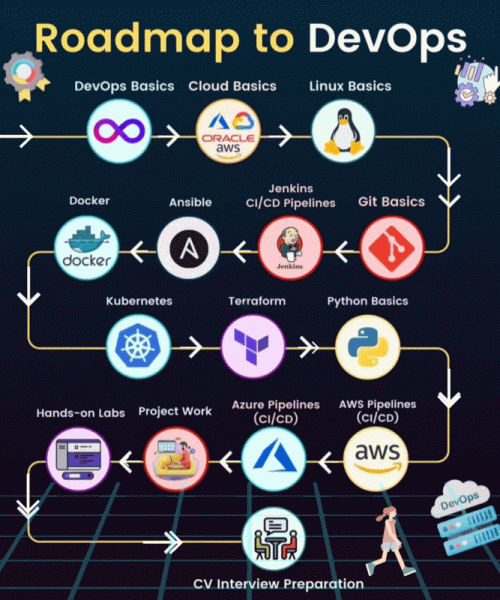
Industry Projects AWS & DevOps
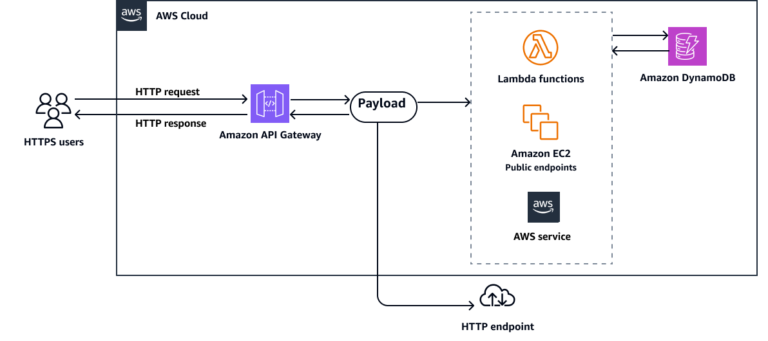
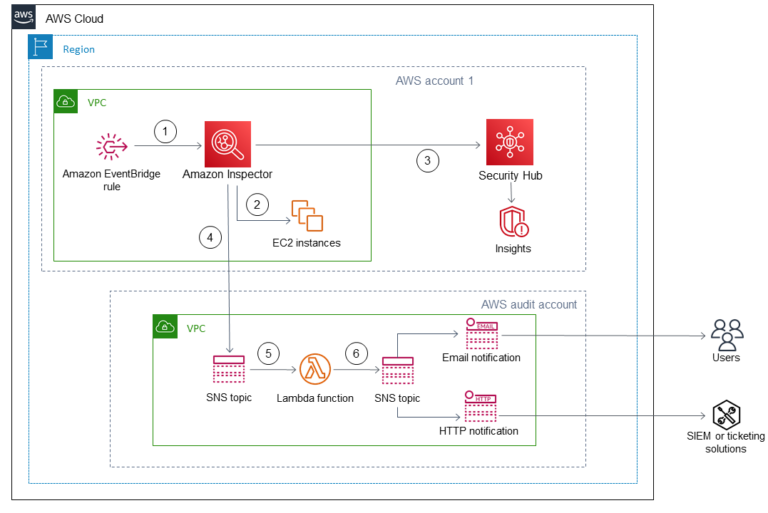
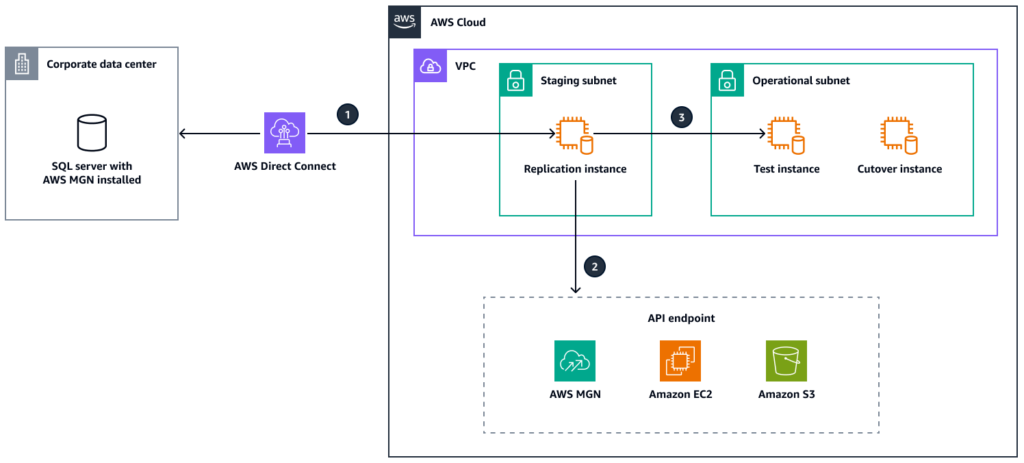
AWS & DevOps Industry projects with Architectures
 Beginner Level Projects
Fundamentals of Cloud, Hosting & Deployment
Project 1)
- CloudCost Navigator
 Master AWS Pricing Calculator & Cost Explorer to plan and control your cloud spending wisely.
Project 2)
- CloudDB Essentials – MySQL on RDS Launch a managed MySQL database using Amazon RDS with backups, snapshots, and performance tips.
Project 3)
- TurboHost with App Runner & Nginx Deploy a lightweight web app using AWS App Runner and NGINX with container-based scaling.
Project 4)
- RapidDot Publish with Lightsail Host and manage a .NET web app on Windows Server 2022 using Amazon Lightsail’s quick-deploy system.
 Intermediate Level Projects
DevOps Basics, Monitoring & Automation
Project 5)
- EC2 Lifeguard – Automated Backup & Restore Use AWS Backup to automatically secure your EC2 environments with restore-ready snapshots.
Project 6)
- VaultPro – Secrets Management with AWS Store and rotate sensitive credentials using AWS Secrets Manager and integrate with your apps.
Project 7)
- CloudPulse – Monitoring with CloudWatch & SNS Monitor AWS services and get real-time alerts using CloudWatch alarms and SNS notifications.
Project 8)
- Serverless Sentinel – URL Health Monitor Build a serverless website uptime checker with Lambda functions and CloudWatch scheduled events.
Project 9)
- SFTP ConnectPro – AWS Transfer Family Set up SFTP/FTPS support for your applications using AWS Transfer Family integrated with S3.
 Advanced Level Projects
CI/CD, Networking, Multi-Tier & Serverless Architectures
Project 10)
- EdgeBoost – Serverless Web Hosting with S3 & Lambda@Edge Deliver blazing-fast content via S3 hosting, CloudFront CDN, and Lambda@Edge for dynamic rendering.
Project 11)
- CodeSprint – CI/CD Pipeline with AWS Tools Automate deployments using AWS CodePipeline with CodeCommit, CodeBuild, and CodeDeploy.
Project 12)
- Git2Cloud – CI/CD with GitHub Actions & ECS Fargate Create a fully automated pipeline using GitHub Actions to deploy containers into ECS.
Project 13)
- FortiStack – Multi-Tier Web App Infrastructure Design and deploy a VPC-powered multi-tier architecture with ALB, EC2, and RDS.
Project 14)
- VPCMesh – Transit Gateway Architecture Enable secure connectivity across multiple VPCs using a centralized AWS Transit Gateway.
Project 15)
- HybridBridge – On-Prem to AWS via VPN Set up a hybrid cloud by connecting your on-prem infrastructure to AWS using a site-to-site VPN.
AWS Certified Generative AI Developer - Professional (AIP-C01)
AWS Certified Generative AI Developer – Professional (AIP-C01)
AWS Certified Generative AI Developer – Professional showcases advanced technical expertise in building and deploying production-ready AI solutions using AWS Services like Bedrock. Perfect for developers with 2+ years of cloud experience looking to advance their careers. For organizations investing in AI initiatives, this certification provides a reliable way to identify and verify developers who can move beyond proofs-of-concept to build production-grade generative AI solutions that deliver tangible business results while maintaining security and cost efficiency.
Course Prerequisites
- Basic understanding of AWS cloud concepts
- Familiarity with IAM, S3, Lambda, and networking basics
- Basic knowledge of APIs, JSON, and serverless architecture
- Prior AI/ML experience is helpful but not mandatory
- AWS account for hands-on labs
- Stable internet connection and computer/laptop
Module- 1) Introduction to Generative AI on AWS
- Fundamentals of Generative AI
- Understanding Foundation Models (FMs)
- Introduction to Amazon Bedrock
- Retrieval-Augmented Generation (RAG) Concepts
- Agentic AI Fundamentals
- Secure AI Application Deployment
- AWS Generative AI Ecosystem Overview
- Certification Preparation Tips
Module- 2) Amazon Bedrock & Prompt Engineering
- Deep Dive into Amazon Bedrock
- Bedrock Playground Hands-On
- Foundation Models Selection Strategies
- Prompt Engineering Fundamentals
- Zero-shot, Few-shot & Chain-of-Thought Prompting
- Bedrock Prompt Management
- Bedrock Guardrails & Automated Reasoning
- Bedrock Knowledge Bases Hands-On
- Retrieval-Augmented Generation (RAG) Implementation
- AWS Well-Architected Generative AI Lens
- Exam Preparation Tips
Module-3 ) Data Engineering for Generative AI
- Building Data Pipelines for GenAI
- Amazon Bedrock Data Automation
- Extracting Data from Documents, Audio & Images
- AWS Glue Hands-On
Amazon Comprehend Hands-On - Amazon OpenSearch Service & Vector Search
- OpenSearch Serverless as Vector Store
- Amazon S3 Vectors
- Amazon Aurora for AI Applications
- DynamoDB WCU/RCU Optimization
- DynamoDB DAX Hands-On
Storage Design for AI Applications - S3 Lifecycle Policies & Replication
- S3 Encryption & Access Management
- CloudWatch Metrics & Monitoring
- Exam Preparation Tips
Module- 4) Building Agentic AI Applications
- Introduction to AI Agents
- Amazon Bedrock Agents
- Planning, Reasoning & Tool Usage
- Knowledge Base Integration
- Guardrails Implementation
- OpenAPI Integration with AI Agents
- Human-in-the-Loop Workflows
- Amazon Q Business Hands-On
- Amazon Q Apps Hands-On
- AI Workflow Automation
- Exam Preparation Tips
Module- 5) Machine Learning Operations with SageMaker AI
- Introduction to SageMaker AI
- End-to-End ML Lifecycle
- Data Preparation & Processing
- Model Training & Deployment
- Multi-Node Endpoint Deployment
- SageMaker Ground Truth
- Human Labeling Workflows
- SageMaker Model Registry
- Foundation Models in SageMaker JumpStart
- Falcon 40B Deployment Concepts
- MLOps Best Practices
- Exam Preparation Tips
Module- 6) Serverless AI Application Development
- Building AI Apps using Lambda & Bedrock
- API Gateway for AI Applications
- Lambda Integration Patterns
- Event-Driven AI Architectures
- AWS Step Functions for AI Orchestration
- Prompt Chaining Workflows
- Circuit Breaker & Retry Patterns
- Dynamic FM Selection using AppConfig
- Request Validation & Error Handling
- SNS, SQS & EventBridge Hands-On
- AppFlow Integrations
- AWS Outposts & Wavelength Concepts
- CI/CD using CodePipeline, CodeBuild & CodeDeploy
- Exam Preparation Tips
Module-7 ) Responsible AI, Monitoring & Governance
- Responsible AI Principles
- Evaluating LLM Performance
- ROUGE, BLEU & BERT Evaluation Metrics
- Amazon Bedrock Model Evaluation
- CloudWatch Logs & Alarms
- CloudTrail for AI Workloads
- AWS X-Ray Hands-On
- CloudWatch RUM
- AWS Lake Formation
- Observability for GenAI Applications
- Governance Best Practices
- Exam Preparation Tips
Module- 8) Security, Identity & Compliance
- Principle of Least Privilege
- IAM Users, Groups & Policies
- IAM Roles & MFA Hands-On
- AWS IAM Identity Center
- AWS Control Tower
- Encryption Fundamentals
- AWS KMS Hands-On
- Secrets Manager Hands-On
- Amazon Macie
- Data Masking & Key Salting
- Secure VPC Design Concepts
- Compliance Best Practices
- Exam Preparation Tips
Module- 9) Analytics & Streaming Services for AI
- Amazon Athena
- Amazon EMR Hands-On
- Amazon QuickSight Dashboards
- Amazon Kinesis Data Streams
- AI Analytics Architecture
- Secure Data Streaming Design
- Exam Preparation Tips
Module- 10) Compute, Containers & Customer Engagement
- AWS App Runner Hands-On
- Amazon EC2 Fundamentals
- Amazon ECS Cluster Deployment
- Amazon EKS Introduction
- Containerized AI Applications
- Amazon Lex & Amazon Connect
- Scalable AI Infrastructure Design
- Exam Preparation Tips
Module- 11) Databases for Generative AI Applications
- Amazon DocumentDB
- Amazon ElastiCache for Redis
- Valkey with ElastiCache & MemoryDB
- Amazon Neptune Analytics
- Vector Search Architectures
- Database Selection Strategies for AI
- Exam Preparation Tips
Module- 12) Developer Tools & Infrastructure as Code
- AWS Cloud Development Kit (CDK)
- AWS CLI Setup & Usage
- CloudFormation Hands-On
- CodeArtifact Hands-On
- Deploying AI Applications using Infrastructure as Code
- Automation Best Practices
- Exam Preparation Tips
Module- 13) AWS AI & Machine Learning Services
- Amazon Rekognition
- Amazon Textract
- Amazon Lex
- Amazon Kendra
- Amazon Augmented AI (A2I)
- Managed AI Services Overview
- Real-World AI Use Cases
- Exam Preparation Tips
Module- 14) AWS Management & Cost Optimization
- AWS Auto Scaling
- AWS Cost Explorer
- AWS Cost Anomaly Detection
- Amazon Managed Grafana
- AWS Systems Manager
- Session Manager
- Parameter Store
- Monitoring & Cost
- Optimization Strategies
- Exam Preparation Tips
Module- 15) Migration & Data Transfer Services
- AWS Transfer Family
- FTP, FTPS & SFTP Integration with S3
- AWS DataSync Hands-On
- Hybrid Cloud Data Transfer
- Metadata & Permission Preservation
- Migration Best Practices
- Exam Preparation Tips
Module- 16) Networking & Content Delivery
- Amazon CloudFront Hands-On
- Elastic Load Balancer (ELB)
- AWS Global Accelerator
- Amazon Route 53
- Networking for AI Applications
- High Availability & Performance Optimization
- Exam Preparation Tips
Module- 17) AWS Storage Services
- Amazon EBS Hands-On
- Amazon EFS Hands-On
- EBS vs EFS Comparison
- Storage Architecture Best Practices
- Persistent Storage for AI Applications
- Exam Preparation Tips
Module- 18) GenAI Architecture & System Design
- End-to-End GenAI System Design
- AI Chatbot Architectures on AWS
- Bedrock + Lambda + API Gateway Integration
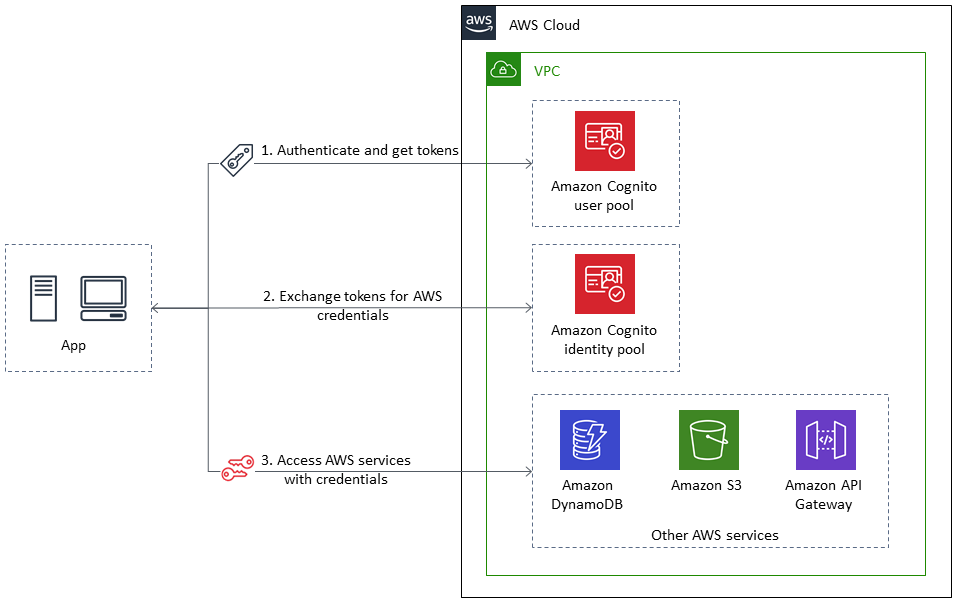
- Cognito Authentication
- AI Security & WAF Integration
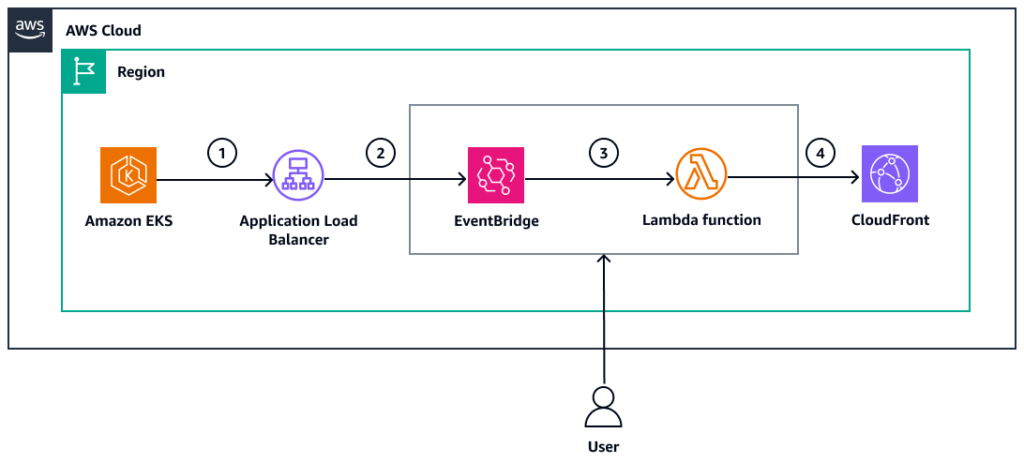
- CloudFront for Public Access
- Choosing the Right Vector Database
- Kendra vs OpenSearch vs Aurora vs Neptune
- Step Functions for AI Orchestration
- Failure Isolation & Approval Workflows
- Production-Ready AI Architectures
- Real-World Design Tradeoffs
Module- 19) Practice Exam
- Practice Exam Walkthrough
- Real-World Case Scenarios
- Final Certification Preparation
- Full Practice Exam (revision 2) – AWS Certified Generative AI
- Developer Professional AIP-C01
AWS Certified Machine Learning - Specialty (Uploading Soon)
AWS Certified Machine Learning – Specialty
AWS Certified Machine Learning – Specialty validates your expertise in building and deploying machine learning solutions in the AWS Cloud. This credential demonstrates to employers that you can architect ML/deep learning workloads, optimize model training, and implement production-ready ML systems following AWS best practices.
AWS Certified Advanced Networking - Specialty (ANS-C01)
AWS Certified Advanced Networking – Specialty (ANS-C01)
AWS Certified Advanced Networking – Specialty validates expertise in complex networking tasks, requiring five years of hands-on experience architecting AWS network solutions. Candidates should have deep knowledge of AWS security, storage, and networking services, plus expertise in advanced architectures including IP VPN, MPLS, automation tools, routing protocols, multi-region solutions, and network security features like AWS WAF, IDS/IPS, and DDoS protection.
Module-1) Introduction to Advanced Networking – Specialty
- Overview of Amazon Web Services
- Understanding the OSI Model in Networking
- Explaining IP Addresses (IPv4 & IPv6)
- Network Devices: Routers, Switches & Hubs
- Concept of Static vs. Dynamic (Automatic) IP Addressing
- Exam Success Tips
Module-2) VPC Architecture Overview
- What is Amazon VPC?
- AWS Global Infrastructure: Regions & Availability Zones
- CIDR Blocks, Public & Private IP Addressing
- Overview of Networking & Content Delivery in AWS
- Key VPC Components: Subnets, Route Tables, IGWs, and NAT
- Default VPC Overview in AWS
- Exam Success Tips
Module-3) VPC Components & Design
- Inbound & Outbound Rules in AWS Security Groups
- Creating a VPC using AWS Wizard Options
- Subnetting Concepts in AWS
- Public vs. Private Subnets Explained
- Custom VPC Setup: Subnets, Route Tables, and Gateways
- Internet Gateway and NAT Gateway Configuration
- Exam Success Tips
Module-4) AWS Global Accelerator
- AWS Global Accelerator vs. CloudFront
- Unicast IP vs. Anycast IP Explained
- Integration with EIP, EC2, ALB, NLB (Public & Private)
- Health Checks and Security Aspects
- Hands-On: Standard vs. Custom Routing
- IP Type Selection, Listener Setup, Endpoint Groups
- Exam Success Tips
Module-5) AWS Verified Access – VPC Peering & Endpoints
- VPC Peering Concepts with Flow Diagrams
- Creating Peering Connections
- Hands-On: VPC Peering Across Accounts & Regions
- Accepting, Rejecting, and Deleting Peering Requests
- VPC Endpoints with AWS PrivateLink
- Interface vs. Gateway Endpoints
- Using Gateway Endpoints for S3
- Exam Success Tips
Module-6) AWS Transit Gateway
- Introduction to AWS Transit Gateway
- Architecture: VPC, Customer Gateway, and ECMP
- Cross-Account Sharing & Direct Connect Integration
- Transit Gateway Attachments & Policy Tables
- Route Tables, Multicast Domain, and TGW ID
- Exam Success Tips
Module-7) Centralized Security – AWS Firewall Manager
- What is AWS Firewall Manager (AFM)?
- Setup Prerequisites
- Key Features and Use Cases
- Pricing Overview: $100/Policy/Month
- Web ACLs, IP Sets & Integration with AWS WAF
- Overview of AWS Shield for DDoS Protection
- Exam Success Tips
Module-8) AWS VPN (Site-to-Site & Client VPN)
- Understanding Site-to-Site VPN in AWS
- Tunnel Options & Lifecycle Management
- Verifying Tunnel Updates
- Creating Customer Gateways
- Configuring Site-to-Site VPN using Virtual Private Gateway
- Exam Success Tips
Module-9) Dedicated Network Connection – AWS Direct Connect
- Overview of AWS Direct Connect & Its Benefits
- Virtual Interfaces, LAGs, and Virtual Private Gateways
- Using the Direct Connect Resiliency Toolkit
- Configuring Classic Connections
- Creating Public & Transit Virtual Interfaces
- Exam Success Tips
Module-10) Network Manager – AWS Cloud WAN
- Introduction to AWS Cloud WAN
- Key Concepts: Global and Core Networks
- Creating Global & Core Networks in Cloud WAN
- Viewing and Deleting Networks
- Network Management at Scale
- Exam Success Tips
Module 11) Global Content Delivery Network – CloudFront
- Introduction to Amazon CloudFront
- Creating Distributions (Web & RTMP)
- Invalidating Cache Objects
- Exposing EC2 & ALB via CloudFront
- Using CloudFront with Private S3 Buckets (OAC)
- Path-Based Routing & Multiple Origins
- Custom Error Pages & Geo Blocking
- Exam Success Tips
Module 12) Elastic Load Balancers
- What is an Elastic Load Balancer (ELB)?
- EC2 Accessibility via Load Balancers
- Application Load Balancer (Layer 7) – Hands-On
- Network Load Balancer (Layer 4) – Hands-On
- Path-Based Routing with ALB
- Launch Templates & Auto Scaling
- Auto Scaling + Load Balancer Integration
- Exam Success Tips
Module 13) DNS & Amazon Route 53
- Introduction to DNS and Route 53
- Registering a Domain with AWS
- Creating A, AAAA, CNAME, Alias Records
- Health Checks & Routing Policies (Simple, Weighted, Latency, Geo, Failover)
- DNS Firewall & Hybrid DNS
- Inbound and Outbound DNS Endpoints
- Exam Success Tips
Module 14) Amazon EKS Networking
- Features, Pricing & Services in Amazon EKS
- EKS Use Cases
- Kubernetes Architecture in EKS
- Creating an Auto Mode EKS Cluster
- Exposing Services: ClusterIP, NodePort, LoadBalancer, Ingress
- Security Groups at Node and Pod Levels
- Exam Success Tips
Module 15) AWS Network Management & Governance
- Overview of AWS Governance Tools
- Working with VPC IP Address Manager (IPAM)
- Using AWS CloudFormation for Network Infra
- AWS Service Catalog – Hands-On
- AWS CloudTrail for Network Tracking
- Exam Success Tips
Module 16) AWS VPC IP Address Manager (IPAM)
- Introduction to AWS IPAM
- Understanding IPAM Pools and Regions
- Accessing IPAM via Console, CLI, SDK
- Integrating IPAM with AWS Organizations
- Creating Top-Level IPv4 Pools
- Creating & Managing IPAM Pools
- Exam Success Tips
Module 17) Final Exam Walkthrough & Certification Guide
- AWS Certified Advanced Networking – Specialty (ANS-C01)
- Step-by-Step Guide to Exam Signup
- Overview of Question Types & Difficulty
- Final Exam Preparation & Mindset
- Bonus Mock Exam and Certification Roadmap
AWS Certified Security - Specialty (SCS-C02)
AWS Certified Security – Specialty (SCS-C02)
AWS Certified Security – Specialty validates your expertise in creating and implementing security solutions in the AWS Cloud. This certification also validates your understanding of specialized data classifications and AWS data protection mechanisms; data-encryption methods and AWS mechanisms to implement them; and secure internet protocols and AWS mechanisms to implement them.
Module-1) Introduction to Security Specialty
- Exam overview
- Security responsibilities (Shared Responsibility Model)
- AWS Acceptable Use Policy (AUP)
- AWS Abuse Report
- Security best practices
- Exam Success Tips
Module-2) Threat Detection & Incident Response – Core Services
- Amazon GuardDuty – Setup, findings, automation
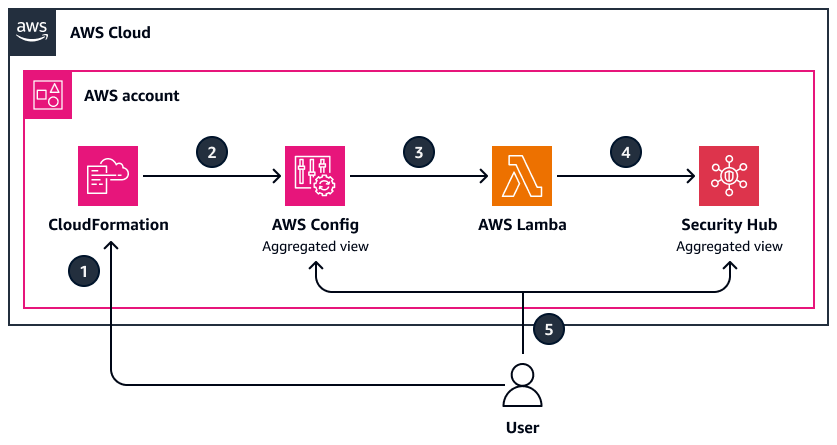
- AWS Security Hub – Aggregation, integrations
- IAM Access Analyzer – Detect overly permissive access
- Exam Success Tips
Module-3) Threat Detection – Compromise Scenarios
- Compromised AWS Resources (EC2, S3, IAM)
- Compromised AWS Credentials – Recovery and response
- EC2 Key Pairs: Management & Exposure Response
- EC2 Serial Console
- EC2 Instance Connect
- Lost EC2 Key Pair (Linux/Windows)
- EC2 Rescue Tools
- Exam Success Tips
Module-4) Incident Response Workflow
- AWS Abuse Reports
- IAM Security Tools
- Response Planning & Automation
- Example IR scenarios and walk-throughs
- Exam Success Tips
Module-5) Security Logging & Monitoring – CloudTrail and CWL
- AWS CloudTrail – Logging API activity
- Amazon CloudWatch Logs, Alarms, Contributor Insights
- S3 Event Notifications
- EventBridge for event-driven security
- Exam Success Tips
Module-6) Monitoring with Amazon Inspector & Systems Manager
- Amazon Inspector – Vulnerability management
- SSM Overview & Prerequisites
- SSM Agent with EC2
- Parameter Store (Secrets vs Plaintext)
- SSM Patch Manager & Maintenance Windows
- Session Manager – Secure shell access
- Exam Success Tips
Module-7) Advanced Logging & Traffic Visibility
- VPC Flow Logs (Hands-on)
- VPC Traffic Mirroring
- VPC Network Access Analyzer
- Amazon Athena for Log Analysis
- OpenSearch (Advanced queries and dashboards)
- Exam Success Tips
Module-8) Network Security – Core Concepts
- VPC Security Overview
- Bastion Host vs SSM
- Site-to-Site VPN
- Transit Gateway
- VPC Peering & Private Link
- DNS Resolution in VPC
- Exam Success Tips
Module-9) Network Security – Edge & Filtering
- AWS WAF & AWS Shield
- AWS Firewall Manager
- AWS Network Firewall
- Amazon CloudFront Security
- API Gateway – Authorization and throttling
- Exam Success Tips
Module-10) Identity & Access Management – Deep Dive
- IAM Users, Groups, Roles, and Policies
- IAM MFA – Configuration & Enforcement
- IAM Roles with PassRole
- IAM Credential Reports
- EC2 Instance Metadata Service v2
- Exam Success Tips
Module-11) Identity Federation & Directory Services
- Amazon Cognito – User pools vs identity pools
- AWS Directory Services – AD Connector, Simple AD
- Exam Success Tips
Module-12) S3 Security – Policies & Access Control
- IAM vs S3 Bucket Policies
- S3 Public Access Block
- Regaining Access to Locked Buckets
- Hands-on with policy examples
- Exam Success Tips
Module-13) Data Protection – KMS & Secrets
- AWS Key Management Service (KMS)
- Customer-managed vs AWS-managed keys
- CloudHSM – Hardware encryption
- AWS Secrets Manager – Rotation, access, integration
- Exam Success Tips
Module-14) Data Protection – Storage Services
- S3 Lifecycle Rules, Replication, Logging
- AWS Backup – Backup vaults and policies
- AWS Data Lifecycle Manager (DLM)
- Elastic Load Balancing (ELB) Security
- AWS Certificate Manager (ACM) – TLS/SSL
- Exam Success Tips
Module-15) Governance – AWS Organizations & Control Tower
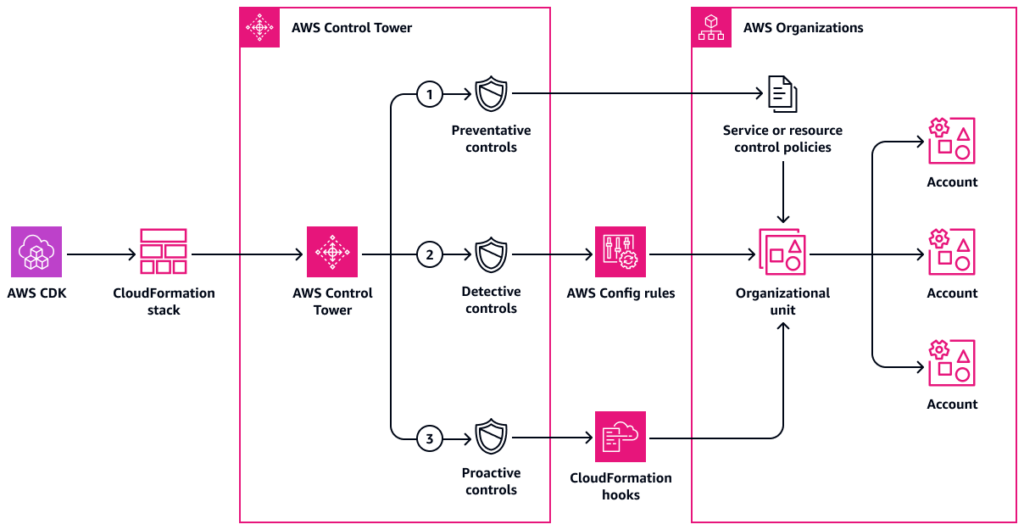
- AWS Organizations – SCPs and account structure
- AWS Control Tower – Landing zone setup
- AWS Config – Compliance rules
- AWS Audit Manager – Evidence and reports
- Exam Success Tips
Module-16) Governance – Billing, Catalog & Templates
- AWS Cost Explorer – Budget alerts and forecasting
- AWS Service Catalog – Product governance
- AWS CloudFormation – Security in IAC templates
- Exam Success Tips
Module-17) Container & Serverless Security
- Amazon ECR – Scanning & Access
- Amazon EKS – RBAC, IAM roles for service accounts
- AWS Lambda in VPC – Permissions, timing, VPC config
- AWS Verified Access – Secure app access
- Exam Success Tips
Module-18) EC2 & RDS Security
- RDS & Aurora – Encryption, IAM, backup
- EC2 AMIs – EC2 Image Builder & Troubleshooting
- EC2 Metadata Security – IMDSv2 enforcement
- Exam Success Tip
Cloud Data Analytics with AWS (Beginner to Intermediate)
Cloud Data Analytics with AWS (Beginner to Intermediate)
Course Objective
This course focuses on building strong data analytics skills using cloud technologies. It is designed for beginners and avoids DevOps, networking, or infrastructure-heavy topics.
Module-1) Cloud Fundamentals
- Introduction to Cloud Computing
- IaaS, PaaS, SaaS
- Benefits of Cloud
- Basic Cloud Use Cases
Module-2) AWS Basics
- Overview of Amazon Web Services
- Regions and Availability Zones
- Pricing Basics
- Shared Responsibility Model
Module-3) IAM (Identity & Access Management)
- Users and Roles
- Permissions (Read/Write access)
- Policies basics
- Practical:
- Create IAM user
- Assign S3 access
- Secure access to AWS services.
Module-4) Cloud Storage – Amazon S3
- Amazon S3 overview
- Buckets and Objects
- File formats (CSV, JSON, Parquet)
- Versioning and Lifecycle basics
Practical: - Create bucket
- Upload/download files
- Organize datasets
- Store and manage data in cloud.
Module-5) Python + Cloud Integration
- Python basics for data
- pandas introduction
- Reading data from S3
- Writing data to S3
- Practical:
- Read CSV from S3
- Save processed data to S3
- Connect Python with cloud storage.
Module-6) Data Processing Concepts
- Data Cleaning
- Handling missing values
- Feature Engineering basics
- Partitioning
- File format optimization (Parquet)
- Practical:
- Clean dataset using pandas
- Convert CSV → Parquet
- Prepare data for analysis.
Module-7) Cloud SQL & Analytic:
- SQL basics (SELECT, GROUP BY, JOIN)
- Amazon Athena
- Querying data directly from S3
- Amazon Redshift (concept only)
- Create Athena tables
- Run SQL queries on S3 data
- Analyze cloud data using SQL
Module-8) Business Analytics (KPIs)
- Revenue
- Growth
- Churn
- KPI concepts
- Practical:
- Calculate KPIs using SQL
- Monthly analysis:
- Understand business metrics.
Module-9) Statistical Analysis
- Correlation
- Hypothesis Testing
- Regression
- Practical:
- Apply statistical analysis using Python
- Generate insights and predictions from data.
Module-10) Visualization & Reporting
- Topics:
- Dashboard concepts
- Amazon QuickSight
- Power BI / Tableau basics
- Practical:
- Create dashboards
- Build charts and report
- Present data visually.
Module-11) Basic Automation (Optional)
- Topics:
- Introduction to automation
- Simple scripts
- Intro to AWS Lambda
- Understand basic automation concepts.
Module-12) Projects (Hands-On)
Project 1: Cloud Data Lake EDA
- S3 + Athena analysis
Project 2: SQL Business Analytics
- Revenue, Growth, Churn
Project 3: Python Data Cleaning Pipeline
- ETL (S3 → Python → S3)
Project 4: Statistical Analysis
- Correlation + Regression
Project 5: Cloud Dashboard
- QuickSight / Power BI
Project 6: Final Capstone Project
- End-to-End Pipeline:
- S3 → Python → Athena → Dashboard